
Tech Report: So far, so good! Or so it seemed… Prior to my recent cardiac extravaganza, I decided to get a new laptop, as my current droid an Alienware unit named “Klaatu,” had been showing its age at six years. So I decided to get ANOTHER Alienware, (the “Aurora” model). I couldn’t get to it until after the operation while recuperating at Fort Frederick, located on the slopes Mt. Angel. MUCHO THANKS to the proprietors!!!
I ran through the setup process, named it “Giskard” after one of Issac Asimov’s robots, (which came from the planet Aurora...) Everything was fine, and then I noted one of those “CLICK TO RESTART AND UPDATE” messages. So I clicked and waited.
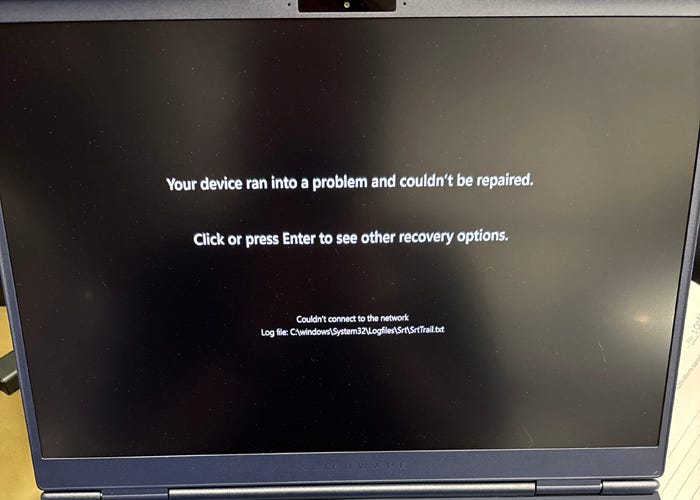
Instead of restarting after the alleged install process, it went into this diagnostic mode with large block letters on the screen; DIAGNOSING YOUR DEVICE followed by REPAIRING YOUR DEVICE and finally stopped with a message: YOUR DEVICE RAN INTO A PROBLEM AND COULDN’T BE REPAIRED. The only option was to reset it back to the factory specs, a drawn out process, followed again with the initial setup process.

It seemed to work, so I started installing my apps and setting it up again. Again I encountered the CLICK TO RESTART AND UPDATE... Which I did — With the SAME results. Once again I reinstalled the factory settings, ran through the setup process, and this time it seemed to work! I didn’t install any of my applications until AFTER getting CLICK TO RESTART AND UPDATE and then I added my apps.
For several days it acted like a champ. Then another CLICK TO RESTART AND UPDATE popped up. By now I was starting to question my choice of laptops, but ran through motions and again the YOUR DEVICE RAN INTO A PROBLEM AND COULDN’T BE REPAIRED. message appeared.
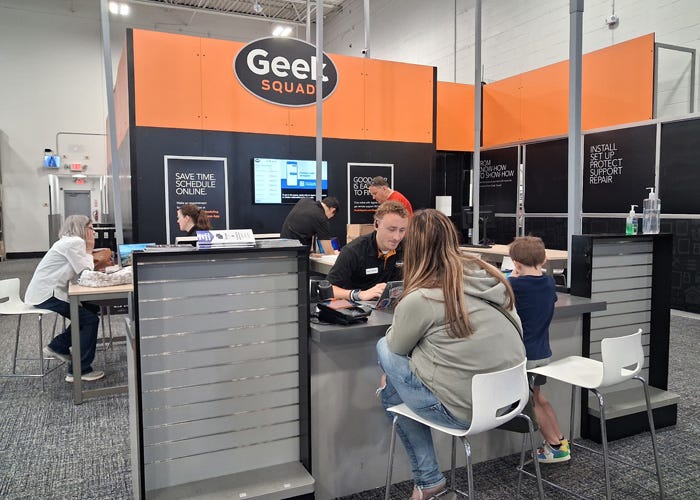
Since I had “bought” the extended warranty option, I decided to take the sucker back. I drove the Salem, and made and appointment with the “GeekSquad.” A week later I was in front of one of the Geeks who was at a loss as to what was wrong with Giskard. She said they could take it apart and run tests, or since I was still in the “Grace Period” they could give me a NEW Alienware Aurora. And since it was now on sale for $450.00 less than what I had originally paid. So I got a $450.00 rebate!
So here I am on the new Giskard typing this stack. I still have a bunch of my legacy stuff to install, but so far, no issues! I will try that tomorrow just in case. I did get a CLICK TO RESTART AND UPDATE message, but like a good droid, it actually RESTARTED! Admittedly after white knuckling it as it ticked away the 18 system updates…
I installed the heavy duty stuff AGAIN: My major graphics, video and audio editing programs, and accessing websites and generally getting it setup with the same stuff as Klaatu. We shall see. The extra $450 got me thinking that since Giskard boasted two SSD slots, (for Solid State Drives as opposed to the traditional “spinners”) I went back to Best Buy and asked about the cost of two 1tb SSD drives for those two slots. Turned out the price was slightly less than the $450 I got back.
There are two flavors of M.2 SSDs: The M.2 2230 and the M.2 2280. I asked about the 2230 since they were slightly cheaper. But the dude said they only have the 2280s and not the 2230s. So I picked two 1tb SSD 2280s then. But I had noted in the AlienWare Aurora manual I download, a section that said; “…only ONE 2280 SSD could be installed if you had a NVIDIA GeForce RTX 5070 Ti GPU…” which of course I had.
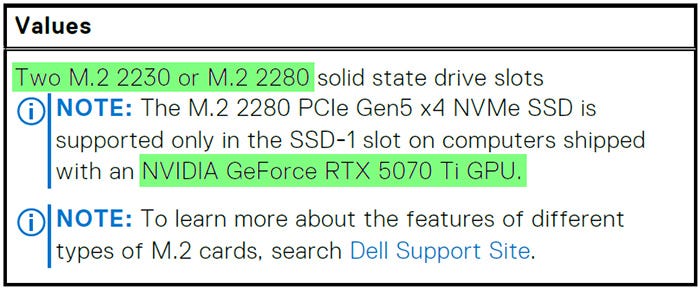
I pointed this out to the dude, and he said that referred to something else and proceeded to sell me two 1tb 2280 SSDs. I insisted that their “GeekSquad” install them, (so that the Geeks would have to deal with any surprises). Wise choice it turned out. So I left Giskard in the able hands of the GeekSquad and headed home.
Several hours later I received a Text informing me that they can only install a single SSD, (like the manual said) but that they would give me a single 2tb 2280 SSD for the same price. OK so far…
About an hour later I received a Text informing me that when it re-started, it came up with the message YOUR DEVICE RAN INTO A PROBLEM AND COULDN’T BE REPAIRED… Which required them restoring the system to factory specs (AGAIN) which of course meant that I would have to re-install everything I had already installed (AGAIN).
By now I was ready to cash it in and get my money back. But instead, I re-installed my stuff, and all went well! It had even “remembered” my PIN, WiFi password and several other adjustments I had made during my initial setup.
So thanks to the GeekSquad, Giskard and I are happy campers! And I will continue to install apps and copy content over. Then I can “retire” Klaatu and hook him up to the Historical Society’s new whiz-bang book scanner, so we can recreate past Silverton History books that have sold out. I’m sure that process will generated another Tech Stack…